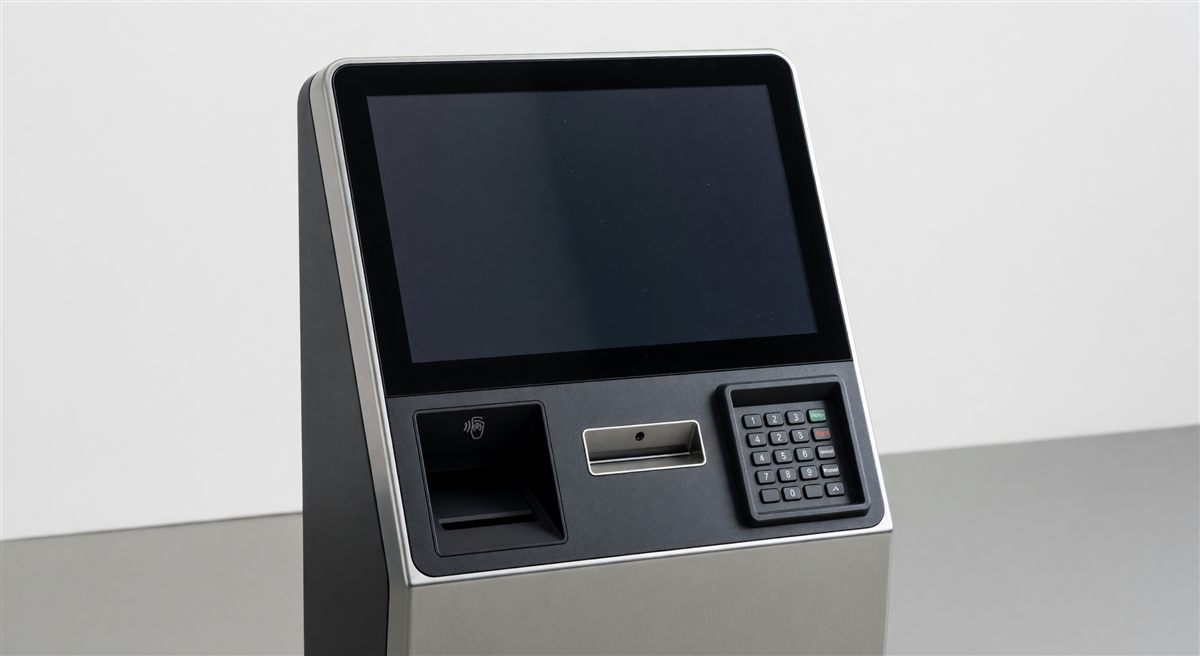
When you receive three quotes for parking pay stations, they will all use different terminology, omit different details, and present specs in ways that make apples-to-apples comparison nearly impossible. One vendor lists “industrial-grade processor.” Another says “quad-core ARM Cortex-A55.” A third just says “ruggedized computing platform.”
This guide translates every specification category that appears in pay station datasheets—what each spec actually means for day-to-day operations, what the acceptable ranges are, and what red flags to watch for. Use it as a scorecard when evaluating proposals.
Why Specifications Matter More Than Brand
Pay stations are installed for 8–15 years. A machine that processes payments reliably on day one but fails at the bill acceptor in year three, or drops connectivity every time the cellular carrier pushes an update, becomes a revenue and staffing problem—not just a maintenance line item.
Most spec disputes come down to three failure modes:
- Underpowered computing hardware that can’t run updated payment software without freezing
- Environmental ratings that don’t match the actual installation site (coastal humidity, desert heat, Minnesota winters)
- Connectivity specs that look adequate but don’t account for the facility’s specific network environment
Knowing what to ask before purchase prevents all three.
Computing Hardware
The processor and memory determine how fast the machine boots, how quickly it processes transactions, and whether it can run software updates in the background without user-facing lag.
Processor
| Tier | Common Specs | Typical Performance |
|---|---|---|
| Entry | Single-core ARM, 600–800 MHz | Adequate for basic pay-by-space; slow menus |
| Mid-range | Dual-core ARM Cortex-A7/A53, 1.0–1.2 GHz | Handles mobile app integrations and dynamic pricing |
| High-performance | Quad-core ARM Cortex-A55 or A72, 1.4–1.8 GHz | Smooth UX, background updates, LPR integration |
What to ask: Request the exact processor model, not a marketing description. “Industrial-grade” tells you nothing. A Cortex-A55 at 1.4 GHz tells you the machine will handle software updates without transaction timeouts.
Red flag: Any spec sheet that only says “embedded processor” without naming the architecture. This typically means entry-grade hardware the vendor doesn’t want to highlight.
RAM
- 512 MB: Minimum workable. Expect slow menu response and limited simultaneous payment modes.
- 1 GB: Standard for current mid-range units. Handles typical workloads without issue.
- 2 GB: Recommended for machines running dynamic pricing, LPR integration, or digital signage on-screen.
Storage
- 4 GB eMMC: Sufficient for firmware and transaction logs on a basic unit.
- 8–16 GB eMMC: Required if the machine caches parking session data locally during connectivity outages.
- 32 GB+: Only necessary for units storing video or high-resolution imagery locally.
Ask whether storage is eMMC (soldered, no moving parts, rated for temperature extremes) or a removable SD card. SD cards are a maintenance liability in high-volume lots—they fail more frequently and can be physically removed.
Display
The display determines whether parkers can complete transactions quickly and without staff intervention.
Screen Size and Type
| Type | Size Range | Best For |
|---|---|---|
| Monochrome LCD | 3.5"–4.3" | Low-traffic, simple rate structures |
| Color TFT LCD | 5"–7" | Standard multi-space pay stations |
| Color TFT LCD | 8"–10" | High-volume garages, multi-language sites |
| Capacitive touchscreen | 7"–10" | Premium units; glove-compatible optional |
Resistive vs. capacitive touch: Resistive touchscreens respond to pressure and work with gloves; they’re more durable in high-abuse environments but less responsive to light touch. Capacitive screens are faster and brighter but require a conductive stylus or bare finger. If your facility has cold winters, confirm whether the capacitive screen is rated for gloved use—many aren’t.
Brightness (Nits)
This is the most commonly underspecified display parameter. Direct sunlight washes out screens rated below 700 nits.
- 400–600 nits: Indoor garages only
- 700–1,000 nits: Covered outdoor lots; partial shade
- 1,000–1,500 nits: Full sun exposure; surface lots in southern climates
- 1,500+ nits: High-altitude, desert, or coastal high-reflection environments
A screen rated at 600 nits installed in a Phoenix surface lot will generate customer complaints and service calls within the first summer.
Payment Hardware
This is where most of the serviceability and revenue risk lives.
Card Reader
Modern pay stations should support both EMV chip (dip or tap) and magnetic stripe. Magnetic-only readers are non-compliant with current card network standards and expose the operator to chargeback liability.
Look for:
- EMV Level 2 certification (required for chip-and-PIN processing)
- PCI PTS 5.x or 6.x compliance (current; 4.x units are approaching end-of-life)
- NFC/contactless support (Apple Pay, Google Pay, contactless cards) — this should be standard on any unit purchased today
- Card reader door/enclosure: Ask if the card reader is protected by a hinged cover or recess. Exposed card slots accumulate debris and attract skimmer attempts.
Serviceability note: Ask whether the card reader is a field-replaceable module. On better-designed units, a technician can swap the card reader in under 10 minutes without removing the entire machine. On cheaper units, card reader replacement requires factory service.
Bill Acceptor
Not every installation requires cash acceptance, but if yours does, the bill acceptor spec matters significantly for maintenance cost.
| Spec | What It Means |
|---|---|
| Bill directions accepted | 1-way (single orientation) adds jams; 4-way accepts bills in any orientation |
| Cassette capacity | 200–500 bills; higher capacity = fewer collection runs |
| Escrow capability | Holds bill during transaction; reduces disputes |
| Operating temperature range | Critical in extreme climates; see environmental specs |
| MTBF (Mean Time Between Failures) | Should be 750,000+ insertions for high-volume sites |
Brand names to look for: JCM, CPI (Crane), MEI (Mars). Generic or unbranded bill acceptors are a strong indicator of a low-cost unit that will require frequent service.
Collection security: Confirm whether the cassette uses a keyed lock, and whether the key is unique to your property or a universal “operator key.” Universal keys are a theft vulnerability.
Coin Acceptor
For lots that still accept coin:
- Confirm which denominations are accepted (some units omit pennies and dollar coins)
- Ask about coin vault capacity and whether it has a separate locked vault or drops into a shared cash box
- Verify the coin acceptor brand (Coinage, Crane/MEI are industry standard)
Receipt Printer
| Spec | Acceptable Range | Notes |
|---|---|---|
| Paper roll diameter | 3" minimum | Smaller rolls = more frequent changes |
| Print speed | 40–80 mm/sec | Faster reduces queue time |
| Printer mechanism MTBF | 1,500,000+ lines | Standard for Epson, Seiko mechanisms |
| Cutter type | Full cut preferred | Partial cut leaves paper attached; customer confusion |
| Weatherproof paper door | Required for outdoor | Paper is sensitive to humidity |
Some operators are moving to receipt-optional configurations (email or SMS receipt) to reduce printer maintenance. Confirm whether the software supports receipt suppression and whether this complies with any local ordinances requiring printed receipts.
Connectivity
Cellular
The cellular modem spec is frequently vague in proposals. Ask specifically:
- LTE Cat 1 vs. Cat M1 vs. Cat 4: Cat M1 (LTE-M) is lower bandwidth but more reliable for IoT devices; fine for transaction data but may slow large firmware updates. Cat 4 handles updates faster. Cat 1 is acceptable for basic transaction processing.
- Carrier lock: Is the SIM locked to a single carrier? Multi-carrier SIMs that automatically failover (Twilio, Eseye, etc.) reduce outages in areas with spotty coverage.
- Fallback: Does the unit fall back to Ethernet or Wi-Fi if cellular is unavailable? For indoor garages, this is critical.
Ethernet
Most units include a 10/100 Mbps Ethernet port. Gigabit is unnecessary for transaction data but useful if you plan to push large firmware updates over the wire. Confirm whether the port supports IEEE 802.3af PoE — this allows powering the unit directly from a network switch, eliminating a separate power run.
Wi-Fi
- 802.11 b/g/n (2.4 GHz): Adequate for transaction throughput; prone to interference in dense environments
- 802.11 ac/ax (5 GHz): Better throughput and less interference; required if the unit will stream video or sync large datasets
- Confirm whether Wi-Fi is an optional add-on module or standard. Some vendors charge $150–$300 for a Wi-Fi card that costs them $12.
Enclosure and Physical Specs
Material and Construction
| Material | Typical Gauge | Notes |
|---|---|---|
| Mild steel | 14–16 gauge | Adequate; requires powder coat maintenance |
| Stainless steel (304) | 14 gauge | Preferred for coastal/humid environments |
| Stainless steel (316) | 14 gauge | Marine environments only; significant price premium |
| Aluminum alloy | — | Lighter; good corrosion resistance; lower impact strength |
Powder coat thickness: Spec sheets rarely list this, but a minimum of 3–4 mils (75–100 microns) is required for outdoor durability. Thin powder coat peels within 3–5 years in UV-exposed environments.
IP Rating (Ingress Protection)
The IP rating is a standardized measure of protection against solids and liquids. The format is IP[solid][liquid].
| Rating | Solid Protection | Liquid Protection |
|---|---|---|
| IP54 | Dust protected | Splash from any direction |
| IP65 | Dust tight | Low-pressure water jets |
| IP66 | Dust tight | High-pressure water jets |
| IP67 | Dust tight | Immersion up to 1 meter |
Minimum acceptable for outdoor pay stations: IP65. IP54 is inadequate for any installation exposed to rain or pressure washing. Be aware that some vendors rate only the electronics enclosure at IP65 while the overall unit has a lower rating—ask for clarification on what the IP rating applies to.
IK Rating (Impact Protection)
Less commonly listed but important for high-vandalism environments.
- IK08: Resists 5 joules of impact (a fist strike)
- IK09: Resists 10 joules (heavy blow)
- IK10: Resists 20 joules (maximum rating; hammer blow)
Surface lots in urban areas should specify IK09 or IK10 for the display cover and cash components.
Mounting
- Pedestal-mount: Freestanding; most flexible placement; requires concrete anchor bolts (typically 4x 3/8" or 1/2" anchors)
- Surface-mount pedestal with cable management: Preferred; all wiring routes through the pedestal, reducing vandalism exposure
- Wall-mount: For garages with wall space; check weight rating and that mounting bracket is included, not an upcharge
Confirm whether the mounting hardware and anchor bolts are included in the quote. Many low-cost vendors ship the unit without hardware.
Environmental Operating Range
This is the single most commonly mismatched specification. A machine rated for -10°C (14°F) will fail in Minneapolis.
| Climate Zone | Required Temp Range |
|---|---|
| Sun Belt / coastal | -10°C to +55°C (14°F to 131°F) |
| Four-season continental | -30°C to +50°C (-22°F to +122°F) |
| Northern plains / Canada | -40°C to +50°C (-40°F to +122°F) |
| Desert Southwest | -10°C to +65°C (14°F to +149°F) |
Heating element: For any installation below -20°C, confirm whether the unit includes a thermostatically controlled heater for the bill acceptor, card reader, and electronics bay. Without it, cold-start failures will occur.
Humidity: Most units are rated 10–95% RH non-condensing. For coastal or tropical installations, ask specifically about salt-fog certification (ASTM B117 or equivalent).
Power Specifications
- Input voltage: 100–240 VAC, 50/60 Hz (universal) is standard. Single-voltage units (120 VAC only) are a problem if your facility ever upgrades power infrastructure.
- Power consumption: 50–150W idle; 200–350W peak (heater active). This affects electrical circuit sizing.
- Solar option: If the unit offers solar, confirm panel wattage (typically 20–50W), battery backup capacity (expressed in amp-hours), and minimum daily sun-hours required to sustain operation. Solar-only units in northern climates often require supplemental power in December–February.
Software and Integration Specs
Hardware specs are only half the picture. The software platform determines long-term flexibility.
API Availability
Ask whether the unit exposes a REST API or uses a proprietary protocol. Proprietary protocols lock you into the vendor’s management software. REST APIs allow integration with third-party parking management platforms, LPR systems, and revenue reporting tools.
Remote Management
Minimum acceptable capabilities:
- Remote configuration changes (rate updates, time-of-day rules)
- Remote reboot
- Transaction log retrieval without physical access
- Alarm/alert notifications (door tamper, low paper, payment failure)
PCI DSS Compliance
Confirm the full payment processing chain is PCI DSS Level 1 or Level 2 compliant, including the management software and payment processor. A PCI-compliant device connected to a non-compliant back-end does not give you PCI compliance.
Specifications Scorecard
Use this checklist when comparing proposals:
| Specification | Minimum Acceptable | Your Requirement | Vendor A | Vendor B |
|---|---|---|---|---|
| Processor | Dual-core ARM, 1 GHz+ | |||
| RAM | 1 GB | |||
| Display brightness | 700 nits (outdoor) | |||
| EMV/NFC payment | Required | |||
| PCI PTS version | 5.x or higher | |||
| IP rating | IP65 | |||
| Operating temp (low) | Matches your climate | |||
| Cellular modem | LTE Cat 1 minimum | |||
| Bill acceptor brand | Named brand | |||
| API type | REST preferred | |||
| Enclosure material | Steel 14 gauge+ | |||
| Warranty | 2 years minimum |
Common Spec Sheet Omissions to Flag
Vendors sometimes omit these specs intentionally. Ask for them in writing before signing a purchase order:
- Exact processor model and clock speed — not just “industrial embedded”
- PCI PTS version — not just “PCI compliant”
- Bill acceptor manufacturer and model
- IP rating scope — does it cover the entire unit or only the electronics bay?
- Operating temperature range — not just “suitable for outdoor use”
- Connectivity failover behavior — what happens to in-progress transactions if cellular drops?
- Firmware update process — over-the-air, manual USB, or factory only?
- End-of-life software support commitment — how many years of security patches?
Summary
Parking pay station specs divide into six areas: computing hardware, payment hardware, display, connectivity, enclosure ratings, and environmental tolerance. Of these, the three that generate the most post-purchase problems are environmental operating range (too narrow for the climate), payment hardware serviceability (non-replaceable modules), and connectivity (no failover).
The scorecard above gives you a structured way to compare quotes side-by-side. Any vendor unwilling to provide exact specifications in each category should be treated with caution—the information exists, and withholding it typically means the spec is below market standard.
For specific product comparisons by brand, see the Pay Station Brand Comparison guide.